

Authentication
The Luminary API uses OAuth 2.0 to authenticate requests. Two flows are supported, depending on how your application accesses Luminary. To get started with either flow, please contact Luminary support — credentials are issued securely and tied to your Luminary organization.
- Client Credentials — for machine-to-machine integrations that act on behalf of your organization.
- Authorization Code — for third-party applications that act on behalf of a signed-in Luminary user.
In both flows, the Client Secret is confidential information and should be stored safely. Do not share your secret API keys in publicly accessible areas such as GitHub, client-side code, and so forth.
All API requests must be made over HTTPS. Calls made over plain HTTP will fail. API requests without authentication will also fail.
This is an overview of the authentication process. For more details, please refer to the OAuth 2.0 documentation.
Client Credentials
Section titled “Client Credentials”Use the Client Credentials flow when your application acts on behalf of your Luminary organization rather than an individual user. You will be securely issued a Client ID and Client Secret tied to your Luminary organization.
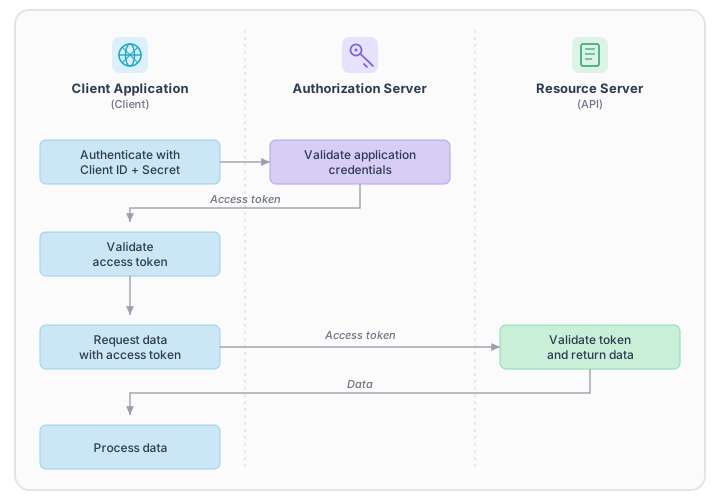
To get an access token, make a POST request to the Luminary authorization server:
curl -X POST "https://auth.withluminary.com/oauth2/token"-H "Content-Type: application/x-www-form-urlencoded"-d "grant_type=client_credentials&client_id=$CLIENT_ID&client_secret=$CLIENT_SECRET"The response will be a JSON object with the following fields:
{ "access_token": "$ACCESS_TOKEN", "token_type": "bearer", "expires_in": 3600}Authorization Code
Section titled “Authorization Code”Use the Authorization Code flow when your application is a third-party app that acts on behalf of a signed-in Luminary user. Each user authorizes your application individually, and the resulting access token is bound to that user within their Luminary tenant. Luminary support will register your application and provide a Client ID, Client Secret, and the redirect URI to use.
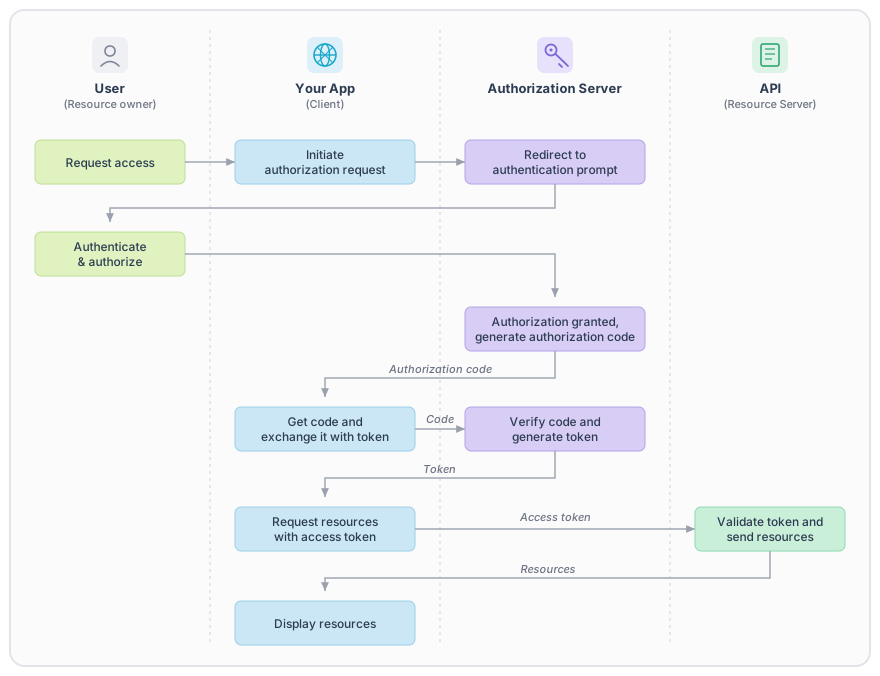
To start the flow, redirect the user to the Luminary authorization endpoint:
https://auth.withluminary.com/oauth2/authorize ?client_id=$CLIENT_ID &redirect_uri=$REDIRECT_URI &response_type=code &state=$STATEThe state parameter is optional but strongly recommended. Luminary returns whatever value you pass back to your redirect_uri unchanged, which lets you use it for two purposes:
- CSRF protection — generate a cryptographically random, single-use value before redirecting the user, store it server-side (typically in their session), and verify it matches on the callback. Reject any callback whose
stateis missing or does not match. - Restoring application state — encode the page the user was on, or any query parameters you need to recover after sign-in, so you can route them back to their intended destination.
A common pattern is to combine both: a random CSRF token plus a serialized return path, encoded as base64 JSON, for example:
{ "csrfToken": "k3J9x...", "returnTo": "/portfolio/123" }Verify the CSRF token on the callback before trusting the returnTo value, and never redirect to an absolute URL that is not on a host you control.
After the user signs in and authorizes your application, Luminary will redirect them to your redirect_uri with a short-lived authorization code. Exchange that code for an access token by POSTing to the token endpoint:
curl -X POST "https://auth.withluminary.com/oauth2/token"-H "Content-Type: application/x-www-form-urlencoded"-d "grant_type=authorization_code&code=$AUTH_CODE&client_id=$CLIENT_ID&client_secret=$CLIENT_SECRET&redirect_uri=$REDIRECT_URI"The response shape matches the Client Credentials flow, plus a refresh_token field you can use to obtain a new access token without re-prompting the user.
Refreshing access tokens
Section titled “Refreshing access tokens”Access tokens are short-lived and expire after 5 minutes. When an access token expires, exchange the refresh token issued alongside it for a new one:
curl -X POST "https://auth.withluminary.com/oauth2/token"-H "Content-Type: application/x-www-form-urlencoded"-d "grant_type=refresh_token&refresh_token=$REFRESH_TOKEN&client_id=$CLIENT_ID&client_secret=$CLIENT_SECRET"Refresh tokens issued by Luminary do not rotate — you can keep using the same refresh token across exchanges. They have no fixed expiration, but should be stored as securely as your Client Secret. Access token lifetime is short; when a request is rejected with a 401, exchange your refresh token and retry.
Using an access token
Section titled “Using an access token”Once you have an access token, you can use it to authenticate requests to the Luminary API. You need to include the access token in the Authorization header of your requests.
curl -X GET "https://your-subdomain.withluminary.com/api/public/v1/households" -H "Authorization: Bearer $ACCESS_TOKEN"If the request is successful, you have successfully authenticated and can now access the Luminary API. When your token expires, you need will need to request a new access token using the same process described above.
If you are using one of Luminary’s SDKs, you can authenticate your requests by passing your Client ID and Client Secret to client. This can be done in the following ways:
- Pass your Client ID and Client Secret to the client constructor
- Set the your credentials as the CLIENT_ID and CLIENT_SECRET environment variables
To review the SDK documentation for your language, please refer to the following links: